Game archives
How to Import and Analyze Your Chess Games from PGN (Online, Club and OTB)
To analyze a single PGN, paste it into an analysis board (Lichess, Chess.com or ChessHunter Playground) and step through it with Stockfish. To analyze all your games together, export them as PGN files, open Imported games on ChessHunter, pick the player and import the files: the games join that player’s opening repertoire, stats, game history and hunting analyses, and only you can see them. A free account keeps up to 100 imported games.

What you get after importing
- Over-the-board, club and online games in one opening repertoire.
- Imports for any player: yourself, a teammate or your next opponent.
- Private: other visitors never see the games you add.
- Free accounts keep 100 imported games, Hunter keeps 10,000.
Why import your chess games at all?
Most players have their games scattered. Blitz lives on Chess.com, a few classical games sit on Lichess, and the games that matter most, the club league and weekend opens, are on scoresheets, in a ChessBase file or in a tournament bulletin. Each site shows you a slice, so none of them tells you what you really play.
Putting those games together answers practical questions. Which defense do you actually choose against 1.d4 when the game counts? Where do your over-the-board games go wrong compared with your online ones? What did your club rival play against you last season? You need every relevant game in one place to see the pattern rather than an impression.
What is a PGN file and how do you read it?
PGN (Portable Game Notation) is the plain-text format every chess program reads and writes. A PGN file has a .pgn extension and can hold one game or thousands. Each game starts with header tags in square brackets, such as [White "Carlsen, Magnus"], [Date "2026.10.04"] and [Result "1-0"], followed by the moves in algebraic notation: 1. e4 c5 2. Nf3 d6, and so on, ending with the result.
You can open a PGN in any text editor, but it is easier to read on a board. Paste it into an analysis board or a PGN viewer and step through the moves one by one.
Step 1: export your games as PGN (Chess.com, Lichess, ChessBase)
Here is where to download your games as PGN for the usual sources:
- Chess.com: open a game, choose Share, then the PGN tab, or select several games in Game History and download them.
- Lichess: use the Export games option on a profile, or the public games export of the Lichess API, which returns a player’s games as PGN.
- ChessBase and other databases: select the games and export or save them as PGN.
- Tournaments: many organizers and pairing sites publish a PGN of the event; The Week in Chess publishes weekly PGN archives of strong events.
- Paper scoresheets: play the moves into the free Playground (or any chess program) and use Export PGN.
Keep the header tags when you can, especially White, Black, Date and Result, and the FideId tags if your file has them. They are how the import recognizes the player and dates each game.
How to analyze a PGN game for free
For a single game, any free analysis board does the job. Paste the PGN, step through the moves and let Stockfish point out the mistakes:
- Lichess: paste the PGN on the Import game page (lichess.org/paste) and request a computer analysis. To keep several games together, create a study and add each game as a chapter from the PGN tab.
- Chess.com: open the Analysis board and paste the PGN to load the game.
- ChessHunter Playground: choose Import PGN, load the game, then compare your moves with the engine and the master database. The best move finder shows Stockfish’s top three moves as arrows.
These boards analyze one game at a time. They tell you where you went wrong in that game, not what keeps going wrong across fifty of them. For that, you need all your games in one place, which is the next step.
Step 2: import many games into ChessHunter
Create a free account, then open Imported games. You can also start from any player page: signed in, you get an Add games (PGN) button next to Hunt this player.
- Pick the player the games belong to: search by name, FIDE ID or Chess.com or Lichess username.
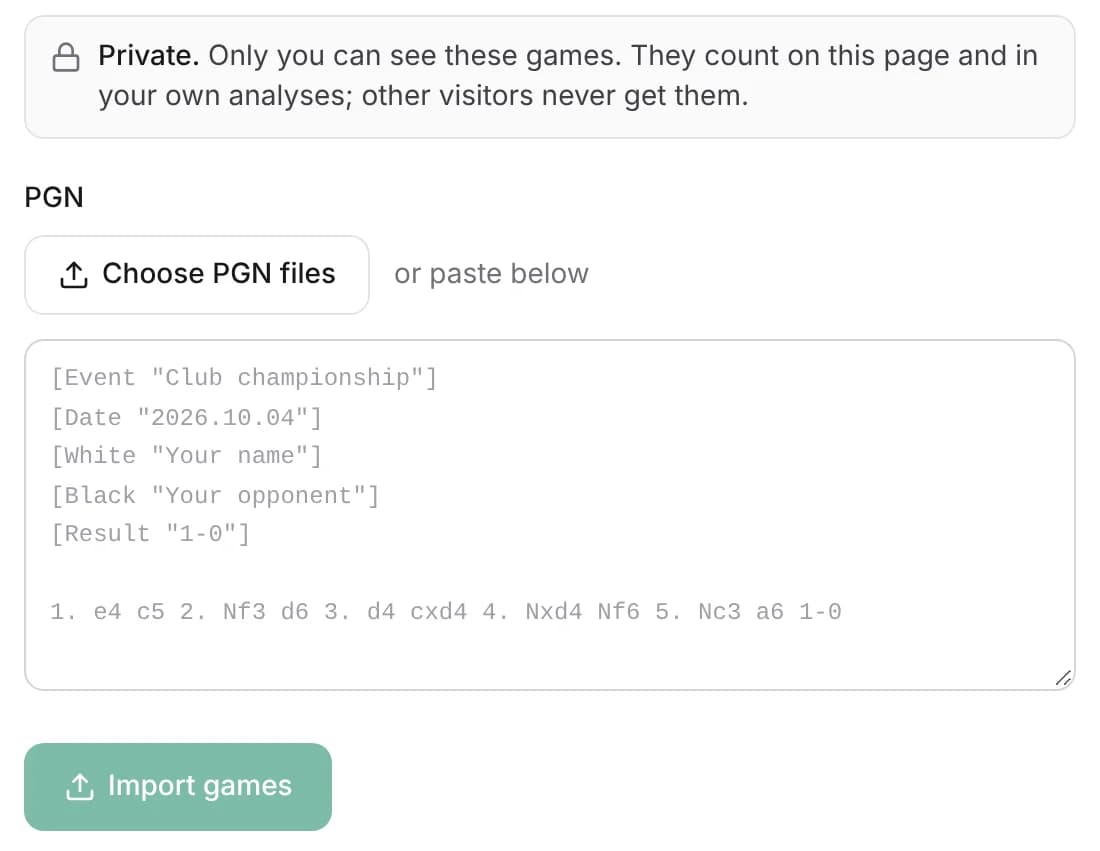
- Choose one or several PGN files, or paste the PGN text.
- Press Import games. Large files are sent in parts automatically, up to about 10,000 games per file.
- Read the summary: how many games were imported, and which were skipped as duplicates, unfinished or without that player.
The player is found in each game by the FIDE ID tag first, then by name or username. If the file spells the name differently, for example “Martin, P.” instead of “Paul Martin”, you are asked which name is them. Importing the same file twice does not create duplicates: a game with the same moves, date and result is skipped.
Step 3: analyze your chess games together
Once imported, the games are part of that player’s profile for you. The opening repertoire tree, the statistics and the game history now include them, next to Chess.com, Lichess and over-the-board games, and each imported game is labeled Imported so you always know where a line comes from.
The scouting report on the profile is rebuilt with your imports too: openings to target and to avoid, clock and tilt stats and a Stockfish pass over the latest games. That makes it useful even for a club player with no online account at all, as long as you have a file of their games.
- Opening repertoire tree for both colors, with your imported games counted.
- Game history with a source filter, so you can look only at your over-the-board games.
- Twin Bot: practice against a bot that plays the player’s opening book, imports included.
- PGN export: download every game of the player in one file, imports included.
How to analyze your chess games: a simple routine
With your games in one place, a short routine turns them into something you can work on:
- Open the repertoire tree with White, then with Black, and look for the branches with the most games and the lowest score.
- Filter the game history to your over-the-board games and compare them with your online results in the same openings.
- Replay two or three losses from a weak branch on the board and note where the position started to go wrong, before turning the engine on.
- Check the critical moments with Stockfish, then write down one idea or one move to change in that opening.
- Import your next tournament games and check whether the branch improved.
Use imported games to prepare against a club opponent
Your next opponent may not play online, or may play there under an account you cannot identify. Their club and tournament games are often the only real evidence of what they play with a serious clock. Import them on the opponent’s player page and they feed the hunting analysis: ChessHunter compares your repertoire with theirs and points to the lines where your strengths meet their habits.
Only your own analyses read the games you imported. A free account includes one hunting analysis per week; Hunter raises it to 100 per month. As always, a small sample is a clue rather than a forecast, so check how many games support a line before building your plan on it.
Privacy and limits
Imported games are private. They appear on a player’s page only for the account that imported them, and they never reach other visitors, the public scouting report or search engines. You can delete any imported game from the Imported games page.
| Plan | Imported games | Hunting analyses |
|---|---|---|
| Free | 100 | 1 per 7 days |
| Hunter | 10,000 | 100 per 30 days |
The limit counts all your imports together, across every player. When a file would go over it, the extra games are skipped and the summary tells you how many.
Frequently asked questions
How can I analyze a PGN chess game?
Paste the PGN into a free analysis board such as Lichess (Import game page), the Chess.com Analysis board or ChessHunter Playground, then step through the moves with Stockfish. To analyze many games together, import the PGN file into ChessHunter and review the opening repertoire and stats it builds.
How do I import a PGN into Lichess?
Open lichess.org/paste, paste the PGN or upload the file, and tick the option to request a computer analysis. For several games, create a study and add each one as a chapter from the PGN tab.
Can I import over-the-board games into ChessHunter?
Yes. Any game you have in PGN can be imported: club league games, weekend opens, team matches or games typed in from your scoresheets. They are then counted with the player’s online games.
Is importing games free?
Yes. A free account keeps up to 100 imported games. The Hunter plan keeps up to 10,000 and includes 100 hunting analyses per 30 days.
Can I import games for another player?
Yes. Imports work for any player, which is how you can prepare against a club opponent with their tournament games. The games stay private to your account.
Will other people see the games I import?
No. Only you see them, on the player’s page and in your own analyses. Other visitors, the public scouting report and search engines never get them.
What if my PGN file contains games of several players?
That is fine. Only the games of the player you picked are imported; the others are skipped and counted in the summary. If the player’s name is spelled differently in the file, you can choose which name is them.
Sources & further reading
Export steps for other sites were checked against their documentation on November 18, 2026; their menus may change. Limits are those of ChessHunter’s plans on the same date.